Free captions that follow the speaker's face
EyeStill Studio finds the person talking and puts the words right next to their lips, a word at a time, moving with them through the shot. It runs in your browser: no account, no upload, no price.
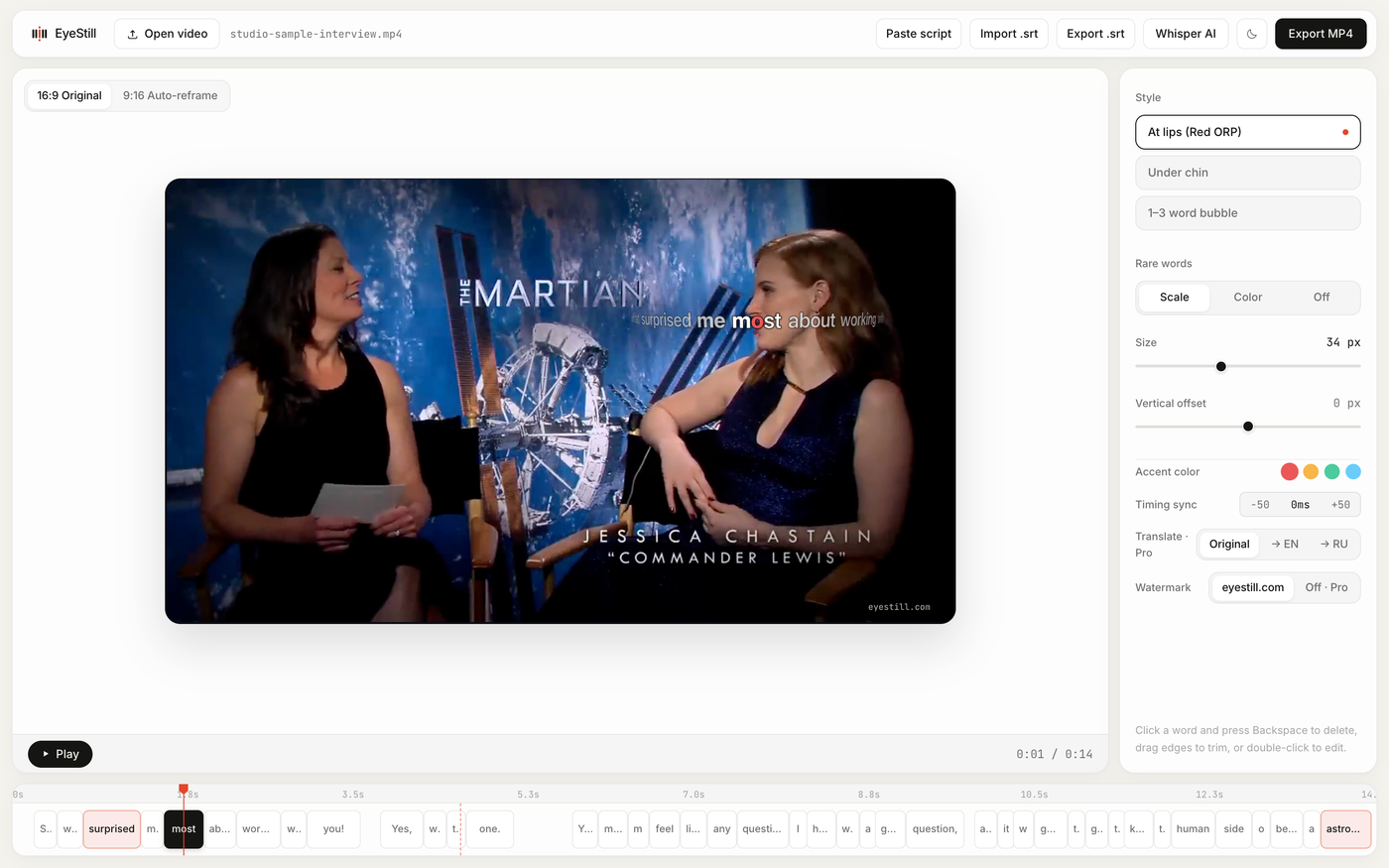
Why at the face
Ordinary captions sit at the bottom of the frame. Your eyes keep jumping between the bottom line and the face, and every jump means missing a little of both: the expression, the gesture, the next word. On a phone in vertical video it's worse, because the bottom of the frame is covered by the app's own buttons and description.
So Studio puts the caption where you're already looking. One word at a time, at the speaker's lips, with a red letter where the eye should land — the same way EyeStill shows subtitles on YouTube. You read the words and watch the face at once.
How it works
- Open a video file. Or try one of the samples: a 9:16 reel or a 16:9 interview with two speakers.
- Words appear by themselves. Speech recognition (Whisper) runs in your browser and times every word. The
model downloads once, on first use. Already have a script? Paste it and Studio lines your text up with the
speech. An
.srtfile works too, in and out. - The caption finds the face. Studio tracks faces through the video, works out who is speaking from the movement of the mouth, notices cuts between shots, and smooths the path so the caption glides instead of shaking.
- Export MP4. With the sound, at the original resolution, encoded right on your computer.

Made for Reels, Shorts and TikTok
Turn on the safe-zone mask for TikTok, Reels or Shorts and you'll see exactly where the app's buttons and text will cover the picture. Have a horizontal video? 9:16 Auto-reframe crops it to vertical and keeps the frame on whoever is speaking.
Make it yours
- Three styles: at the lips, under the chin, or a small bubble with one to three words.
- Size and position: how big, and how far from the mouth.
- Accent colour: red, amber, emerald or sky blue.
- Rare words stand out — slightly bigger, in colour, or not at all.
- Fix anything: double-click a word to retype it, drag its edges on the timeline to change its timing, select it and press Backspace to delete it, or shift every caption earlier or later in 50 ms steps.
Free, and nothing to sign up for
There is no account in Studio at all: no email, no login, no trial that runs out. Open eyestill.com/studio and start. There's no export limit and no cap on video length beyond what your computer can handle.
Your video never leaves your computer. Recognition, face tracking and the MP4 encoding all happen in the browser tab — nothing is uploaded to us or to anyone else. That also means it works for footage you can't share yet.
The one thing we ask: exported videos carry a small eyestill.com mark in the corner. That's how people find Studio, and how it stays free.
Honest limits
- It needs a recent desktop Chrome or Edge: the export uses the browser's built-in video encoder (WebCodecs), which Safari and Firefox don't fully support yet.
- Recognition is best for clear speech in one language. Music, crosstalk and heavy accents will need a few manual fixes — or paste the script.
- A long video takes a while: everything is computed on your machine, not on a server farm.
Watching rather than making? The same captions-at-the-lips work on any YouTube video with the EyeStill extension for Chrome — subtitles one word at a time next to the speaker, translated if you like.