EyeStill for Claude and ChatGPT
An app that opens what you want to read in a speed reader inside the chat.
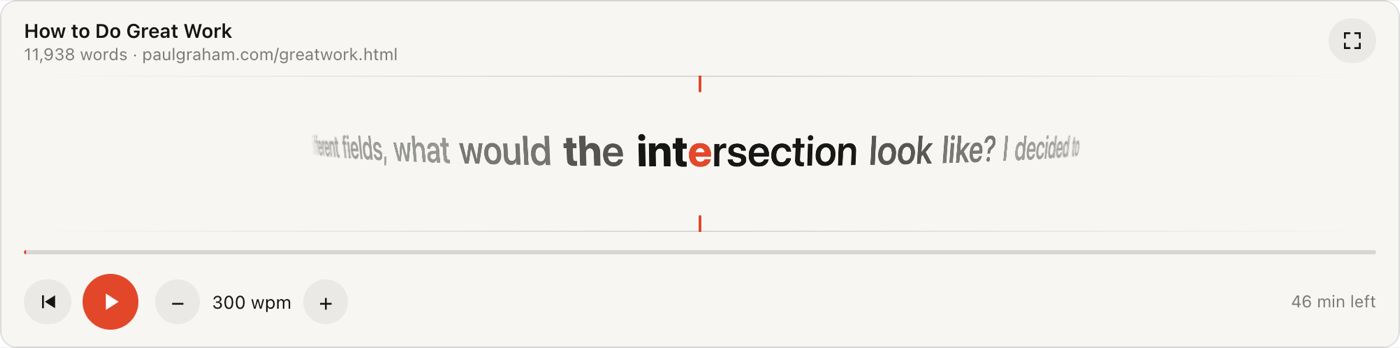
Words appear one at a time at a single point of focus, on a gently turning 3D drum, so your eyes stay still instead of running along lines. Ask the assistant to read a web article, a public-domain book by title, or its own answer. No account and nothing stored.
Connect it
Server address: https://eyestill.com/mcp (no sign-in needed).
Claude
- Open Settings → Connectors and choose Add custom connector (or find EyeStill in the directory once it is listed).
- Name it EyeStill and paste the address above.
- In a chat, ask: “Read https://paulgraham.com/greatwork.html with EyeStill.”
ChatGPT
- Open Settings → Apps & Connectors (custom apps may need Developer mode under Advanced settings).
- Create an app with the address above and no authentication.
- Pick EyeStill in the chat's tools menu and ask the same.
What to ask
- An article or page: “Speed-read this with EyeStill: [link]”. Menus, footnotes and reference lists are left out.
- A book: “Open Pride and Prejudice in EyeStill at 400 words per minute.” Books come from Project Gutenberg and load part by part as you read.
- An answer: “Explain how RSVP reading works, in EyeStill.” In Claude the reader starts while the answer is still being written. Say “answer in EyeStill” once and later answers in the conversation go to the reader too.
- Commands: in Claude's + menu, under EyeStill: “Read the last answer in EyeStill” and “Answer in EyeStill”.
The reader
| Play / pause | The red button, a click on the words, or Space. |
|---|---|
| Back | The ⏮ button or ← steps back a sentence. |
| Speed | − and + (or ↓ and ↑), 100 to 1,000 words per minute in steps of 25. |
| Position | Drag the line under the words. |
| Full screen | The button in the corner, where the app supports it. |
Longer words and the ends of sentences and paragraphs stay on screen a little longer, so the average pace matches the speed you set.
Limits
- PDF files are not supported yet; paste the text instead.
- Pages that need JavaScript or a login have no readable text for the app; paste the text instead.
- Only public websites can be opened, and books only from Project Gutenberg.
- YouTube videos are for the EyeStill Chrome extension, which shows subtitles at the speaker's lips.
Tools
read_with_eyestill (read-only): opens the reader with exactly one of url,
book or text; optional title and wpm. The reader itself calls
eyestill_fetch_text to load the next part of a long book; it is hidden from the assistant.
Privacy
The assistant sends the server the link, book title or text you asked to read. The server fetches that page or book, extracts the text and returns it to the reader; nothing is stored. Details: privacy policy. Use of the app is covered by the terms of service.
Help
Write to support@eyestill.com or see support.